
Project Portfolio Management
Change Management


Today, timelines can shrink, scopes can change, needs and demands can shift unpredictably, and risks can arise without warning. Project teams have no choice but to remain agile and adapt.
Most of the challenges that slow them down come from tools that don't fit how they work. Planview AdaptiveWork (formerly Clarizen) addresses them in one platform, and how it's configured decides how well it works.
Adaptive project management embraces change and uncertainty. It uses flexible planning, continuous value delivery, iterative development, and cross-functional collaboration to achieve strong project outcomes, which lets teams respond quickly and confidently when priorities shift.
Yet many teams still can't work this way, because their project management tools lack the speed and flexibility it takes. Those tools can actively hold teams back, no matter how solid the strategy or how dedicated the team is.
Does this sound like your project team? Here are the challenges that come up most, and if you're not facing them yet, chances are you will.
Getting the right people on the right tasks sounds logical, but it's often challenging. Outdated or inaccurate skill mapping leads to poor assignments, and high-demand employees get overbooked and burn out while others sit underused.
Capacity planning relies on good data too, and unreliable or outdated information can derail even the best-laid plans. Many tools don't allow for testing "what-if" scenarios, which leaves teams unprepared when priorities change.
In AdaptiveWork, resource managers track expertise in the Skills module and can filter by skill when assigning people. Cost and billing rates set by person or job title tie each assignment to its cost. Because rates are date effective, each work item uses the rate in place when it started.
The Capacity Planning workspace compares demand with available capacity by group, job title, or person, in hours, FTEs, or days. Resource managers can also model what-if scenarios for new requests or shifting priorities without changing live data.
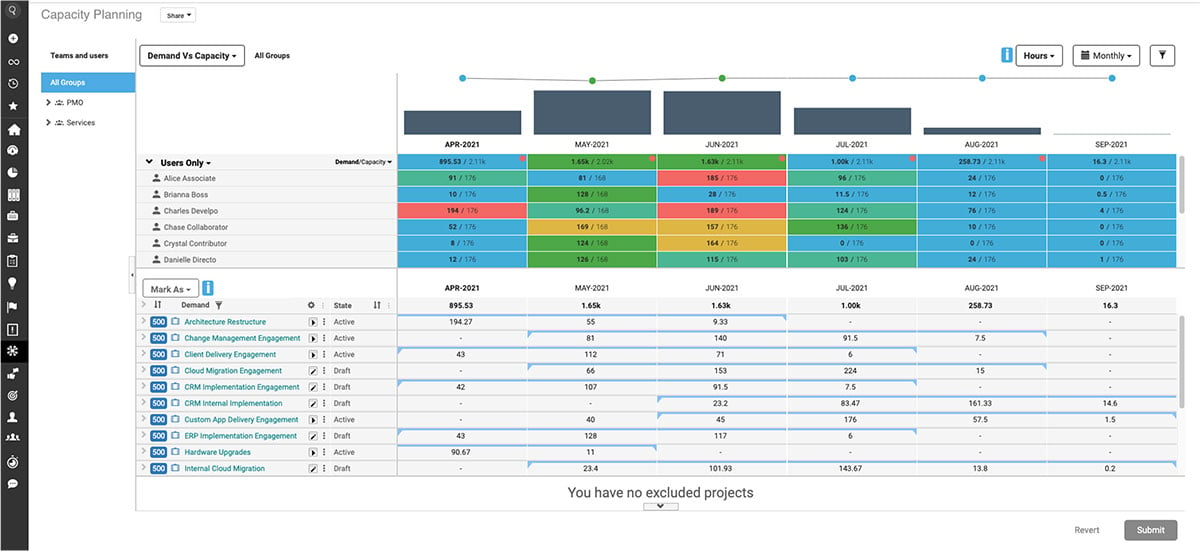
Capacity Planning in Planview AdaptiveWork. Source: Planview
None of this works well with stale data. Before go-live, it's worth deciding which skills to track and who keeps availability up to date.
Overly complicated task management tools often create more confusion than clarity. When a system doesn't adapt to how people work, or tasks don't connect to the tools people already use, the result is missed deadlines and dropped responsibilities.
Time tracking has its own problems. Manual logging is inefficient and prone to errors, and when time tracking isn't connected to invoicing, it can delay billing and impact cash flow.
AdaptiveWork gives each team member a My Work view of their tasks, with personalized workflows and a mobile app for updates on the go. Team members log hours in the Timesheet widget in My Work, then submit timesheets to their project manager or direct manager for approval. Billable and non-billable time are tracked separately, and utilization trend analysis shows managers where effort is going.
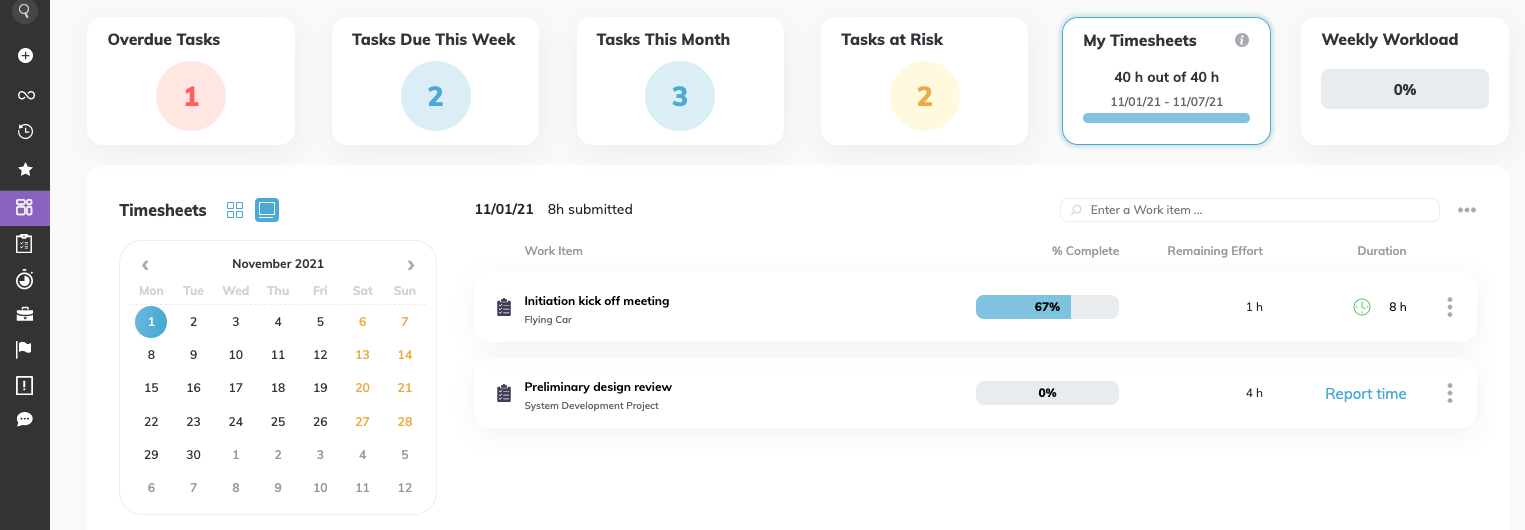 My Work and timesheets in Planview AdaptiveWork. Source: Planview
How reliable that time data is depends largely on setup, especially which work items are open for time reporting and how approvals route.
Gantt charts and work breakdown structures (WBS) come with a steep learning curve, and as projects grow more complex, charts can become cluttered and hard to interpret. In dynamic environments, dependencies get harder to manage, and distributed teams working at the same time can fall out of sync.
Communication suffers when conversations are spread across email, chat tools, and in-tool discussions, which makes key information hard to find.
Project templates give each new project a consistent starting structure. When dates change, Shift Dates moves a project's assignments and staffing requests together, which keeps the schedule and the staffing plan aligned. Discussions are tied to the specific projects and tasks they're about, and external collaborators such as clients can be invited in.
AdaptiveWork is highly configurable, which is a big part of its appeal. It also means the choices made during setup matter a lot. Common signs an environment needs attention include technical debt from years of changes and configuration that hasn't kept up with new releases. Sometimes one or two people are managing the whole tool on their own. These can be fixed without starting over once someone looks at the environment as a whole. For more on what gets missed, see the hidden costs of DIY PPM implementation and why technology adoption fails after go-live.
Planview Anvi, Planview's AI, is available in AdaptiveWork with an Anvi subscription. Project managers can ask questions about their project data in plain language, spot emerging risks, and draft updates for stakeholders. Anvi works from your AdaptiveWork data, so a clean setup also means better answers. Read more in What is Planview Anvi?
A goal without a plan, or the tools to carry it out, is just a wish. AdaptiveWork gives you the tools, and Planview reports that it was named a Leader in the 2026 Gartner® Magic Quadrant™ for Adaptive Project Management and Reporting for the fifth consecutive year. Getting value from those tools depends on how well they're implemented and maintained over time.
We're one of North America's most experienced PPM implementation teams, with more than 1,000 implementations behind us. We sell and implement Planview AdaptiveWork for organizations ranging from city governments to energy, data center, retail, and telecom companies. Most of that work is deciding what to standardize and what to keep flexible, so the setup fits the way each organization plans and delivers.
Planview AdaptiveWork, formerly Clarizen, is portfolio and work management software for PMOs. It brings demand, resource and capacity planning, project execution, time tracking, and financials into one platform. Planview Anvi adds AI with an Anvi subscription.
Yes. Planview acquired Clarizen in 2021 and renamed it Planview AdaptiveWork. It's the same platform, now part of Planview's product family alongside Planview Portfolios and PPM Pro, and Planview has continued to develop it, including adding AI through Planview Anvi.
Yes. Planview AdaptiveWork supports waterfall, agile, stage-gate, and hybrid delivery in one system. A PMO can keep consistent governance across the portfolio while each team works the way that fits its projects, and all of it reports from the same data.
Whether you're choosing AdaptiveWork or already running it, talk with our team about where your setup stands and what would help most.