
Strategic Planning
Project Portfolio Management

Most PMOs have moved past asking whether AI can help. The questions now are what it will do with their data, who decides what it can see, and what it will cost. In Clarity and Rally, those questions have clear answers. Vaia is the AI built into both, and in Clarity you can bring your own AI by connecting the provider of your choice. Nothing runs until an administrator turns it on, and Vaia only uses the data your administrators allow.
In practice, Vaia saves time in the places teams already work.
| Role | What Vaia helps with |
|---|---|
| Project managers | Answers without running reports, and quick summaries of project status |
| Portfolio and PMO leaders | A fast read on roadmaps and on which projects need attention |
| Agile teams (Rally) | Faster backlogs, from themes down to user stories |
| Administrators | Bulk updates through AI tools, with the same permissions in place |
Vaia became generally available in Clarity 16.4.1 in February 2026, and its AI agents are where most of the value is. Administrators define agents for a workspace, an object like a project, or a subobject like risks. They also decide what each agent can draw on, whether that's specific fields, a saved view, or documents attached to the record. Administrators can build agents from a prompt library instead of writing every prompt from scratch.
With the right agents in place, a project manager can ask how many hours are left on a project, or who hasn't submitted timesheets, instead of running a report. Vaia can summarize a roadmap or a project's status report, which gives leaders a quick read before a review. Agents can also check a project against a set of data rules, such as missing dates, budget overruns, or inactive stakeholders, and point to the handful of lines in a 1,000-line work plan that need attention. The same approach works at the portfolio level, where a manager with 100 projects can see which ones have more than five critical risks without chasing every project manager for an update.
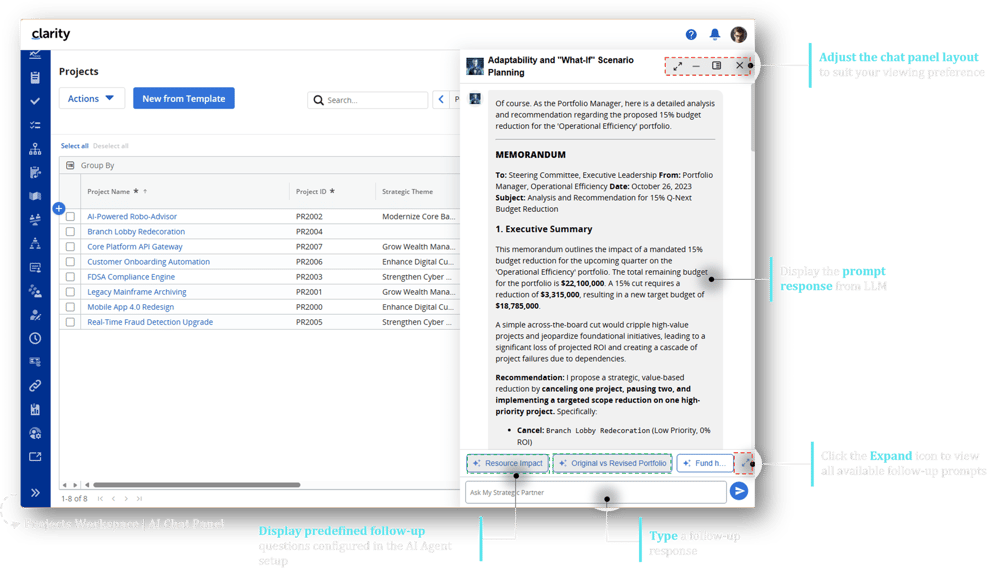
Source: Clarity 16.4 release notes
Clarity also has an MCP server, which lets AI applications such as Claude and Cursor connect to Clarity to read and update data. Since Clarity 16.5, those applications can connect through the user's normal sign-in, work within that user's existing access rights, and never see a password. Administrators decide what AI applications are allowed to create, update, or delete. That means a bulk change that once took hours of process building can come down to a single instruction, with the same permissions still in place.
In Rally, Vaia helps teams turn a theme into epics, features, and user stories, and it answers questions about team performance and flow in plain language. Teams can create several features or stories at once with the AI assistant, or break an existing feature into user stories based on its description and acceptance criteria. The assistant can also help write descriptions and acceptance criteria. Rally's AI features stay off until the subscription administrator turns them on, and that setting applies to everyone in the subscription. Customer data in Rally isn't used to train AI models.
| Decision | Who makes it |
|---|---|
| Which AI provider and model Clarity uses | Your organization, through its own account with Azure OpenAI, OpenAI, Google Gemini, or Anthropic |
| Whether Vaia is on in Clarity | Your Clarity administrators |
| What each agent can see | Administrators, agent by agent: fields, saved views, and documents |
| What AI applications can change through the MCP server | Administrators decide what can be created, updated, or deleted |
| What each user can reach through an AI application | Clarity's existing access rights, which those applications work within |
| How much each AI response can cost | Administrators can limit output tokens |
| Whether AI is on in Rally | The Rally subscription administrator |
The first row matters most. Bringing your own AI means Vaia works with a provider your organization chooses, under an agreement you already control. Your data goes where that agreement says it goes, and your security team can review a provider it may have already approved instead of starting from scratch.
When Vaia is part of a security and risk review, the same questions tend to come up. These are the ones we hear most, with the answers Broadcom's documentation supports.
Some environments can't connect to an outside AI service at all, and that's worth knowing before a project plans around Vaia. It's one reason we ask about the AI provider at the start of a Clarity implementation rather than at the end.
Because you bring your own AI, usage runs through your own account, which makes AI spend worth tracking the same way you track the rest of your portfolio. ValueOps AI Tokenomics, which runs in Clarity, is built for that. It tracks AI spend across vendors and models and ties it to the work and outcomes it supports, so finance and IT leaders can see what the spend is producing and not just what it costs. Get the AI Tokenomics brief.
AI doesn’t fix messy data or unclear processes, and it tends to amplify whatever is already there. An agent that flags missing dates is only useful if your team agrees on which dates matter.
If you're not sure whether your Clarity data and processes are ready, a Solution Health Check is a good way to find out.
Setting up the AI provider, agents, and prompts is part of how we implement Clarity, alongside security and reporting, so AI is planned from the start instead of added later. We've set up Vaia for customers on their own AI providers, we help answer the questions your security and risk teams raise, and our team builds the agents that make Vaia useful day to day, from data-quality checks to portfolio red flags. Our team has worked with Clarity since 2004 and has more than 1,000 PPM implementations behind it, and we support Clarity after go-live through managed services. To see how Clarity works before you plan for AI, watch Clarity 101.
Yes. Vaia works with your organization's own AI provider. You connect an account with a supported provider, such as Azure OpenAI, OpenAI, Google Gemini, or Anthropic, and Vaia sends your prompts, along with the Clarity data your administrators allow, to that model. Usage is billed through your own account, so the model, the agreement, and the costs all stay with you.
In Rally, no. Customer data in Rally isn't used to train AI models. In Clarity, it depends on the AI provider you connect. Activating Vaia means sharing the Clarity data your administrators select with that provider under your own agreement, so that agreement decides how the data is retained and whether it can be used for training.
Vaia works inside Clarity, where administrators define agents that summarize and analyze Clarity data for users. The MCP server works the other way: it lets outside AI applications such as Claude connect to Clarity to read or update data, within each user's access rights and the limits administrators set.
Talk with an advisor about where AI fits in your Clarity or Rally setup, what to turn on first, and what your security team will want to know.