
Artificial Intelligence
Release Updates
Clarity

Project management is steering one ship. Portfolio management is orchestrating a fleet, and the hardest part is deciding which ships leave port when there are only so many crews to go around.
In Planview Portfolios, that decision runs through investment and capacity planning (ICP). It weighs the work people want to fund against the budget and people available to deliver it over time, so leaders can see what fits before they commit.
This post explains how ICP works in Planview Portfolios and where we see teams get stuck, whether they're setting it up for the first time or trying to fix a plan nobody trusts.
Investment planning decides which work gets funded. It ranks proposed projects, programs, and other investments by the value they're expected to deliver and how well they support strategy, then checks them against the budget.
Resource capacity planning decides whether that work can actually be done. It compares the roles and people each investment needs with what's available in each period, after the day-to-day work that keeps the business running.
Each answers only half the question. A ranked list with no capacity check leads to approving more than teams can deliver, and a capacity plan with no priorities can't tell you what to drop when demand runs over. ICP puts both in one place, so funding and staffing decisions are made together.
The pattern we see most often is simple: the business approves more work than its teams can deliver. A few causes come up again and again:
Planview describes ICP as five steps, and each one builds on the one before it.
Most of this work happens in the Planning Manager, which gives four views of the same portfolio. Rank orders investments with their costs and benefits side by side. Analyze moves investments above or below the funding line to approve or defer them and shows the effect on budget and capacity. Shift shows where demand exceeds capacity by period and lets you move start dates and durations to fit. Balance compares the time-phased impact of accepted investments against capacity and budget targets.
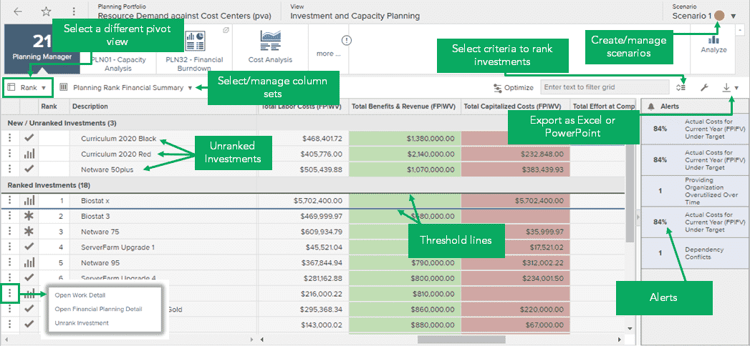
Planning Manager, Rank view. Source: Planview Customer Success Center
Scenarios are where the real planning conversations happen. A shared scenario gives the team one proposed plan to review together, and user-defined scenarios let anyone test a change, like adding a project or pushing another back a quarter, without affecting the financial plan. Ranking and approval decisions take effect only when they're published.
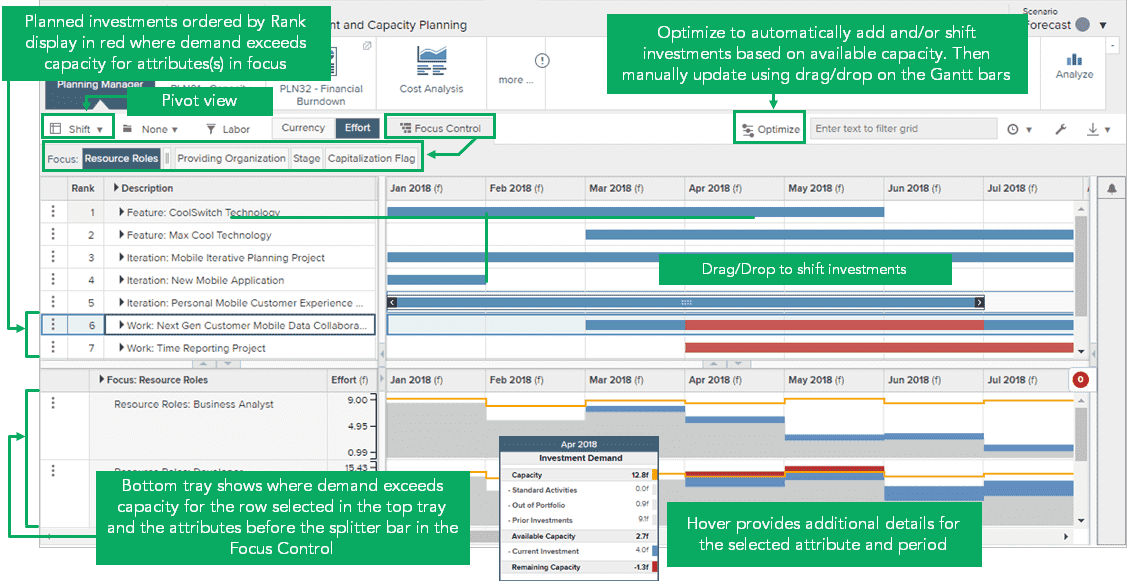
Planning Manager, Shift view. Source: Planview Customer Success Center
Planview supports five ways to set up ICP, and the right one depends on how your organization funds work. Top-down work planning is the simplest place to start, and the others can be added as planning matures.
| Approach | Best fit |
|---|---|
| Top-down work planning | Tracking how a department's budget is consumed by the work it delivers |
| Cost center-based planning | Planning capacity by department or cost center |
| Program-based planning | Planning the projects and work that deliver a program |
| Strategy-based planning | Breaking strategic funding down into the initiatives and programs that deliver each strategy |
| Product outcome-based planning | Planning investment in new products or the development of existing ones |
Planview notes that some customers use only the first three steps, and that ranking and analyzing alone can be a valid place to stop. That's often the right first goal: one trusted view of what's being asked for, what's funded, and what teams can take on. Shifting dates and balancing against targets can come once the data underneath is reliable.
A few things make that first cycle go more smoothly:
Planview Portfolios can do a great deal, and most of the work in getting ICP right is in the setup: the planning approach, the data that feeds it, and the process around it. Our team has worked with Planview Portfolios customers for years, and we can help at whatever stage you're in. If you're getting started, our strategy and advisory and custom implementation services shape the planning approach and the data it needs. If ICP is already live but isn't working, a Solution Health Check looks at your configuration and process and lays out what to fix. And if you want ongoing support, managed services keep the setup current as your planning grows.
Investment and capacity planning (ICP) is the set of Planview Portfolios capabilities for deciding which work to fund and staff. It weighs demand, meaning proposed and in-flight investments, against capacity, meaning budget and people, over time. Leaders can then rank investments, test scenarios, and publish a plan that fits what the organization can deliver.
Capacity planning looks ahead at the portfolio level and asks whether the organization has enough people, by role or team, to take on the work it wants to fund. Resource management works at the project level, assigning named people to specific tasks. In Planview Portfolios, ICP uses capacity to decide what to approve, and resource management staffs what's approved.
The most common reason is missing financial data. ICP pulls demand from each project's cost and effort figures, and projects with nothing in the planning window aren't brought in. Adding even a rough estimate usually fixes it. If projects are still missing, the planning portfolio's setup is worth a closer look.
Whether you're setting up ICP for the first time or fixing a plan nobody trusts, we'll look at where you are and recommend a practical next step.