Planview
Project Portfolio Management
Capacity Planning

Many organizations rely on Jira for agile team execution but struggle to see and steer work across multiple teams. This post looks at how adding Rally alongside Jira closes that gap without changing how your engineering teams work day to day.
One question comes up in almost every Rally demo we run: “If my team is already using Jira, why would we need Rally? Don’t they do the same thing?” It’s a fair question, and the answer is both yes and no.
Yes, they are both leaders in agile execution at the team level. Jira allows individual teams to manage their user stories, defects, tasks, and features in a consolidated and collaborative way. For many companies, that’s all they need.
But what about when we need to see information about multiple teams, a team of teams, a program, a product, or a portfolio? That is where the no comes in. While Jira does an excellent job at the individual team level, Rally scales easily to the team of teams, programs, and higher levels, with capacity forecasting, prioritization, roadmapping, and reporting built for that scale.
This post isn’t a straight comparison of Rally and Jira. It shows how the two work together, and covers how ConnectALL links them without code and how Rally compares with Jira Align.
With Jira’s standard boards, it is difficult to see into the work of multiple teams without performing some serious navigational gymnastics. We know how important it is to understand not only what different teams are working on but also the dependencies between teams and the progress of those dependencies as they relate to our own work. Rally offers multiple ways to display this information so it can be easily consumed by program managers, product owners, or the entire organization.
As a program manager or RTE (Release Train Engineer), it is critical to monitor the progress of all work across teams. Below is Rally’s Iteration Status page for an Agile Release Train, with each team in its own swimlane.
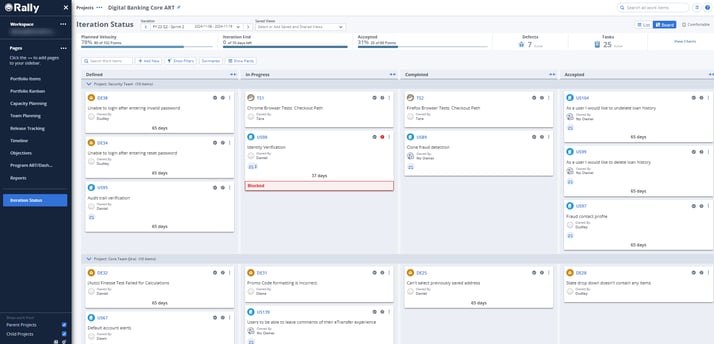
A user can see each work item (User Story, Test Case, Defect) being worked on across all teams and the progress each has made. They can also see who owns it, whether it is blocked, and whether there are dependencies. Furthermore, without leaving this view, they can open any work item as a flyout with more information.
Notice that the data for the Core Team shown here comes from Jira, while the Security Team works out of Rally. The team's execution of the work does not affect the program manager's ability to use Rally.
Program managers can also use portfolio-level Kanbans to examine the broader flow of work and gain insight into features and epics across the organization.
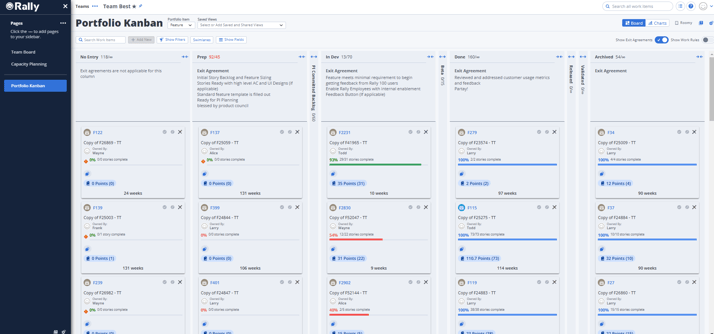
Using simple parent-child relationships that already exist in Jira, Rally can help users understand the bigger picture and the progress of work moving across the organization.
The most frequent challenge we encounter when working with Jira teams, or any agile teams for that matter, is nailing down capacity planning (i.e., how much work each team can accomplish in a given time period).
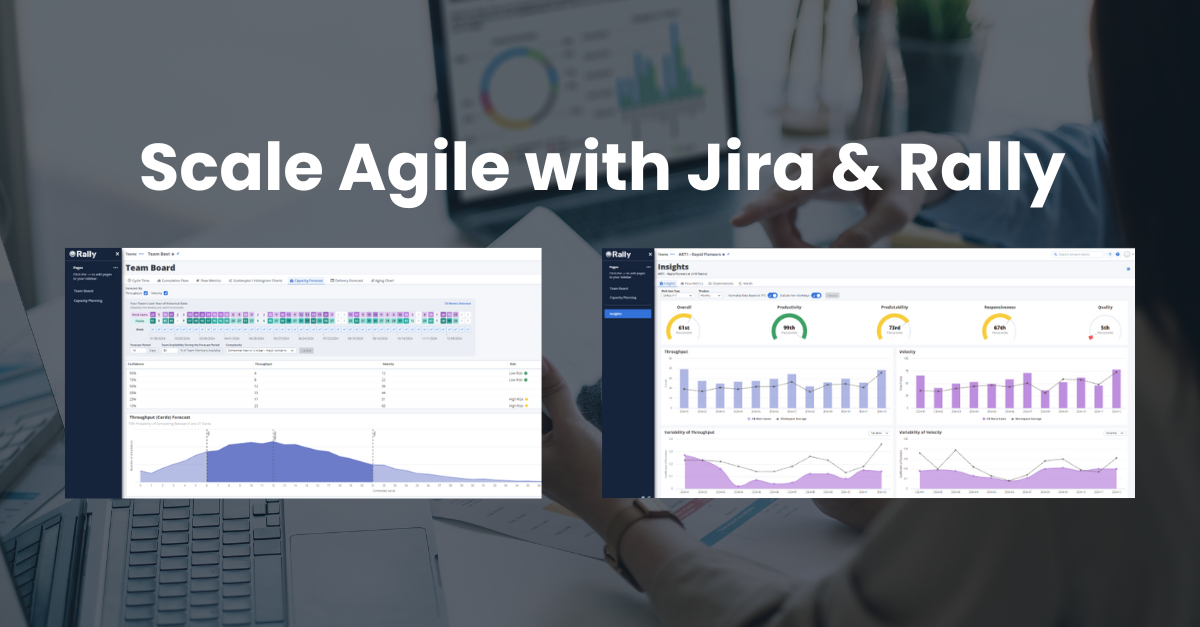
Rally’s Capacity Forecasting, on the Team Board, runs thousands of Monte Carlo simulations using a team’s delivery data from the past year. You set three inputs:
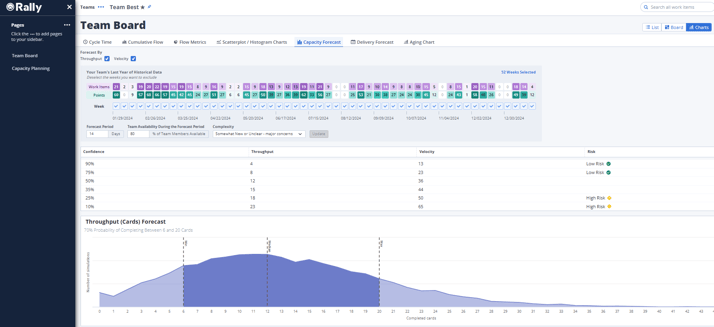
Instead of a single number, Rally returns a range at different confidence levels, such as 50% or 90%, in work items or points. Planners then use that capacity in Rally’s Capacity Planning to assign features to each team for a release without overloading anyone.
Jira’s standard reports focus on individual teams and boards, and cross-team planning needs Plans in Jira Premium. Reporting across teams is built into Rally.
Even if your organization isn’t ready to scale to programs, Rally can still help individual teams working in Jira with flow metrics, cycle time, cumulative flow diagrams, and more.
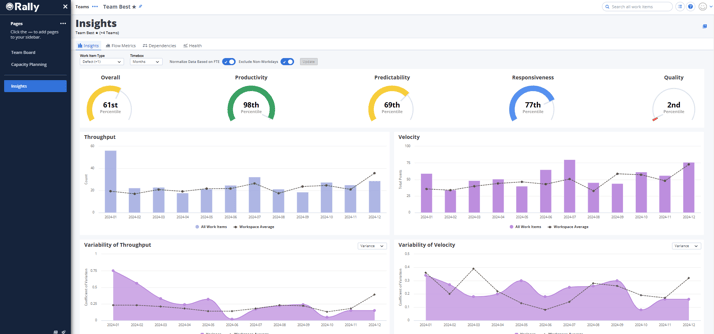
Rally Insights also benchmarks your teams against other Rally teams using the Software Development Performance Index (SDPI), which scores productivity, predictability, responsiveness, and quality. The SDPI overview in Rally’s documentation explains how it’s calculated.
At this point, you might be wondering how exactly we integrate Rally and Jira. Your mind might jump to a traditional integration using third-party software, which is complex and requires frequent maintenance whenever a configuration change is needed.
ConnectALL is an integration hub that builds and maintains integrations without code. It has out-of-the-box connectors for both Jira and Rally, so linking the two is mostly configuration. Our Clarity and Jira guide walks through a similar ConnectALL setup in about 15 minutes.
Jira Align is Atlassian’s enterprise agile planning product, and many teams assume it’s the natural fit because of the name. It began as AgileCraft, which Atlassian acquired in 2019, so like Rally it connects to Jira through integration rather than being built into it. Atlassian now sells it as part of its Strategy Collection, alongside Focus and Talent.
The real question is how they compare. If you mainly need Jira data rolled up at the program level, Jira Align can do that. If you want to plan above the program level, forecast capacity from each team’s actual delivery history, or get deeper flow analytics, that’s where we see Rally pull ahead.
Our team has implemented and supported Rally for years. If you’re evaluating Rally, our strategy and advisory services help decide how Rally and Jira should split the work. If you’re ready to connect them, our integrations and migrations team builds and tests the ConnectALL setup. And if Rally is already live, managed services keep it running as your teams and programs grow.
Yes. Teams keep working in Jira, and ConnectALL syncs their work items into Rally. Program managers and leaders then use Rally to see work across teams, plan capacity, and report on flow.
Jira is built for team-level execution. Rally covers team execution too, and adds planning and reporting across teams of teams, programs, and portfolios.
Rally runs Monte Carlo simulations on a team's past year of delivery data, adjusted for availability and work complexity. It returns a range of outcomes at different confidence levels instead of a single number.
Whether you're adding Rally to a Jira environment or connecting the two for the first time, we'll look at where you are and recommend a practical next step.